Home → Civic & Social Analytics → Youth Services — NGO Analytics
Case 8 · Youth NGO Analytics — Community Insights (Synthetic 2026–2035)
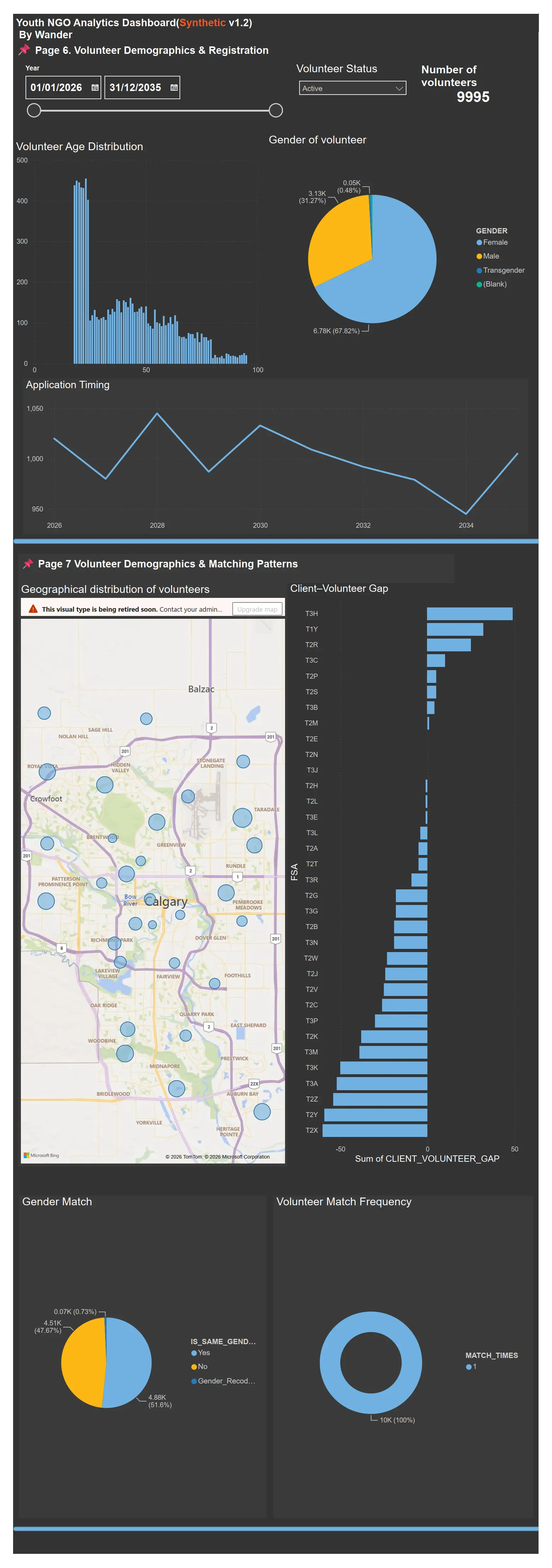
This case uses synthetic 2026–2035 data to explore how a Calgary youth NGO might see demographics, equity, and programme participation through a unified analytics lens — all built with Oracle SQL/ETL and Power BI.
Youth NGO Analytics Dashboard (Synthetic v1.2)
Designed and developed a full-stack analytics solution for a Canadian youth NGO — starting from relational tables, through ETL pipelines, and into an interactive Power BI model.
The original project involved real client and volunteer data, so both the organization and project names are anonymized. To keep the structure and analytical patterns re-usable, I generated over 100,000 rows of synthetic data with a timeline from 2026 to 2035, including a scenario where an economic downturn (2026–2028) puts extra pressure on youth services.
Tools: Oracle, PL/SQL, Power BI, ETL, Data Modelling, Anonymization
Data: 100,000+ rows of anonymized / synthetic records
Focus: Demographics, GIS, Programme Participation, Trauma Impact, Volunteer Matching

 Share on X
 Share on LinkedIn
 Share via Email
🔧 Page 8 — Operational Suggestions for Better Data Insights
-
Implement monthly snapshot tables.
To support historical and time-based analysis, create snapshot tables with an automatic month-end backup (for example at23:59:59on the last day). These jobs should be fully automated. -
Enable change tracking via log tables.
Record key activities — registration, programme changes, and status updates — in dedicated log tables. For small schemas with simple dependencies, database triggers are often enough. This adds traceability and richer signals for analytics. -
Standardise community fields for better location accuracy.
Use dropdown selections instead of free-text entry to reduce typos and improve address quality. This supports better travel-time matching between youth and volunteers, and more reliable geographic analysis.
Example: Selecting “Edgemont” auto-fills City and Region (Calgary → Northwest → Edgemont), or use a step-by-step selection: City → Region → Community.